

Developing
an effective training program for commissary and cafeteria employees involves
several issues: how the training will be delivered; how scheduling will
work; and how the training program will be designed.
"There are several different approaches to training," said Bill Russell, president of Russell Associates, a Le Sueur, Minn.-based company that creates custom computer-based interactive training programs for businesses.
"Classrooms with live instructors or videos are common ways companies train today. The only problem is that many classrooms and videos offer passive exposure. Students may be present, but they 'glaze-out' and don't retain the information."
Computer-based interactive training is a good alternative to traditional classroom or video training methods, especially where safety issues are concerned. "When it's interactive, computer-based training keeps students alert and involved," Russell said. "It monitors students' knowledge and understanding at every step."
Established in 1980, Russell Associates was an early pioneer in the use of computers as a training tool. By 1982, they were working with some of the first computer-based training programs to be used by business and industry. Russell Associates has developed a number of training and testing programs for various industries on subjects such as food safety, workplace safety, food processing, process controll, equipment operation and customer service, just to name a few.
Scheduling and Consistency
When considering delivery methods for your training program, scheduling is another factor to consider. "In a classroom situation, it can be difficult for a manager to schedule training times that all employees can attend, and coordinate those times with instructors' schedules," Russell noted. "Also, if training is taking place at multiple sites, the logistics of transportation must be considered as well."
Scheduling problems can also affect the consistency of training.
Consistency is an often overlooked factor when it comes to training. "Many times training is done by managers, or people who once performed the job for which they're training others. Unfortunately, this method opens the door for inconsistent training, and biased training," Russell said.
When training jobs that have a high turnover rate, as commissaries can, efficient, uniform training processes are vital to maintain quality. With computer-based training, employees can train any time, with a group or on their own. "Besides making scheduling easier, computer-based interactive training allows for consistent, one-on-one training," Russell said.
Making employees feel valued
In any training program, it is vital that employees understand their role in the larger goals of the company.
"Training should not just teach a job," said Russell. "It should help employees understand their industry. They need to know who is depending on them. It instills a sense of pride and responsibility."
Commissary employees isolated
Employees who work in a commissary are far from the consumer, so it's easy for them to lose sight of their role in the company. Training should show them that people depend on the food they prepare to be tasty, fresh, good quality and readily available to them when they're in a hurry. To illustrate this point, video clips can be incorporated into training, showing steps from food preparation to delivery, to consumption.
 Vending
route delivery people should understand that they are the "face" of the
company, often the only person the customer gets to see. Therefore, it
is especially important they act pleasantly, appear well-groomed and provide
good customer service. Customer service can be taught especially well
through computer training.
Vending
route delivery people should understand that they are the "face" of the
company, often the only person the customer gets to see. Therefore, it
is especially important they act pleasantly, appear well-groomed and provide
good customer service. Customer service can be taught especially well
through computer training.
Role playing: a real life scenario
Role playing situations can be presented using animation and sound. Then consequences can be shown based on the answer selected. Answer "A" might elicit anger on the part of the customer, while answer "B" results in a smile and "thank-you." This approach helps reinforce appropriate customer service behaviors before the employee ever sees a customer.
Training on-site cafeteria workers should not only involve the mechanics of their job, but a company background that makes them feel a part of the corporation they serve. Company videos can be integrated into computer-based training for a seamless, consistent approach no matter where the employees are trained.
How to teach the job
Computer-based training gives vending/foodservice companies a simple way to train for jobs in a clear cut, consistent manner. It also provides a simple way to ensure that employees have absorbed the training, and not just attended it.
Things like process control for commissary employees can be easily taught through computer training. Food assembly lines are set up for efficiency and portion control. Once they've been taught the various components of the Job, employees could walk through the virtual assembly of a sandwich as part of their training. By clicking and drag- ging on food items and measuring devices, they could be tested on proper assembly, portion control, cleanliness, and any number of factors.
This approach to training then allows employers to go back and teach to deficiencies, if necessary. If an employee demonstrates proper assembly, but poor cleanliness, that portion of the training could be easily revisited.
Vending route delivery people can learn time management skills through computer training. Part of their training could involve tracing the shortest route to make several deliveries on a computer-generated map. Or it could set up potential problems for them to solve and still make deliveries on time.
Delivery people must also be well-trained in appearance and placement of product. Computer-based interactive training can demonstrate product gone bad as a result of delivery negligence, perhaps with animated germs, flies or bugs swarming around it to make the point memorable. It could also show actual photos of good product that is well presented.
Proper product placement can be taught to delivery personnel through the click and drag method. A graphic pre-sentation of a vending machine can be presented on screen, along with products that need to be placed. Training would involve clicking and dragging the products to position them properly in the machine.
Reinforce safe behaviors
Unlike other training methods, computer-based interactive training forces students to react at every point to keep the program moving. This ensures the student is alert and involved and the program is moving at exactly the correct speed. The program gives constant supportive correction or feedback to student responses.
Computer-based interactive training can teach most subjects in half the time (or less) than classroom training.
Particularly in a commissary, there are a number of safety issues that need to be addressed in a thorough, efficient and organized manner during training. These safety areas include physical safety, food safety, good manufacturing practices and housekeeping. All these safety components can be conveyed very effectively through computer-based training which incorporates test, graphics, audio, video and animation to make lessons memorable.
Computers help dramatize key points
Computer-based training can illustrate what happens when cleaning chemicals are used improperly. For example, when a question about cleaning chemicals is answered incorrectly, it might show animated fumes rising from the cleaning bucket, and the on-screen employee turning green and falling to the floor with feet in the air. "Animation is a highly effective teaching tool, one that really helps modify behavior," Russell said."Studies show that animated computer training makes lessons 50 to 70 percent more under-standable."
Good safety training addresses everyday safety, as well as emergency safety measures. Proper training can help employees react calmly and appropriately in unusual situations. For example, on-site cafeteria workers should be trained to handle a kitchen fire.
Computer-based training can show the scenario of a grease fire, and using the 'click and drag' method, have employees walk through the steps they would take to handle such an event.
 Use specific
examples
Use specific
examples
The program could show an animated fire in one corner, and a fire alarm, a fire extinguisher, baking soda and a fire proof blanket. The employee then must click the symbols in the appropriate order. Should they pour baking soda on the fire first, or pull the fire alarm? The computer will time and evaluate their response and re-teach, if necessary. It can show the consequences of a wrong decision.
"These kinds of illustrated scenarios will stick with an employee, much more than a standard written test question ever could," Russell said.
Key benefit: a real understanding
"This is really training to modify behavior, not just expose employees to the 'right' answers."
Computer-based interactive training is not only highly effective, it can also help with paperwork. It can be used to train employees to identifiable standards, and provide documentation that all employees have been trained.
How to put it all together
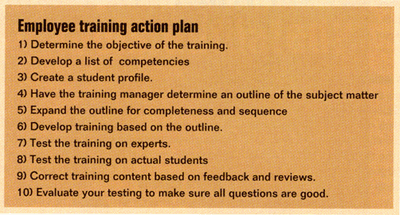
With any kind of training program, proper program design is key to its effectiveness. Russell noted 10 basic steps to ensure a high-quality training program. If any of these steps are overlooked, the training program suffers. These steps are as follows:
1) Determine the objective of the training. All training programs seek to modify employee behavior somehow. Determine exactly what you want your employees to be able to do at the end of training. These are items as basic as "wash hands before entering the food assembly line." You need to be as specific as you want the training to be. Also, identify those points for which you want to teach why a behavior is important.
2) Develop a list of competencies. What must each employee be able to do at a given level of training? Know whether your objective is to comply with a government mandated requirement, to simply expose them to material, or is your goal to have them understand the subject and/or modify behavior? Your objective could be a combination of all these.
3) Create a student profile. Determine who will be undergoing training. Consider their age, gender, education, learning skills, language proficiency, etc. A student profile helps you develop a program that is just right for that group. It identifies what words to use, sentence structure and length, what examples are most relevant. It also helps if you know their background to determine the audio, visual or text items they can relate to. This profile can also help determine the cadence and presentation style you use.
Recognize language barriers For example, if English is a second language for many of your employees, you would want to use smaller words, some-times use more words, and a slower presentation. You would probably read or paraphrase more of the test than in another presentation.
4) Have the training manager determine an outline of the subject matter to be covered based on the competencies and student profile. A common error in developing training is for a person to immediately start developing the final product. This approach is inefficient because you may develop material that doesn't flow in a logical sequence, or contain layered learning, constant feedback, environmental relevance, decision/consequences, etc. Without an outline, you may leave things out of the training or be redundant. An outline allows you to develop a skeleton which, when fleshed out, will be exactly what you want.
5) Expand the outline for completeness and sequence at least once, maybe a second time. It's a good idea to get feed back from others in your organization to expand the outline before working on a final product.
6) Develop training based on the outline.
7) Test the training on experts. This step is important to find out whether your training is technically correct before trying it out on students.
8) Test the training on actual students to determine usability, under-standability and effectiveness. This will help ensure the training flows and that an average cross section of of students can understand it.
9) Correct training content based on feedback and reviews.
10) Evaluate your testing to make sure all questions are good. A question missed by many students may indicate the question is poorly written, or that point was not covered well enough in the training.
"Companies who don't follow these steps can still implement a training program that's compliant to their guiding organization (FDA,IES or other agency)," Russell said. However, if you really want to modify behavior with your training, it's vital that these steps be followed."